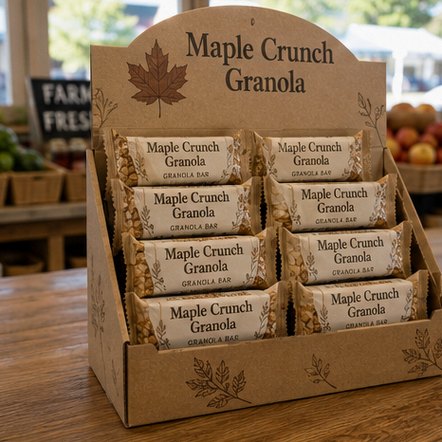
Good display box artwork starts with the dieline: you place your logo, header message and product imagery on the flat layout so every panel reads correctly once the box is folded. Customized Display Boxes supplies the dieline, builds a free mockup within 24 hours, and lets you revise the artwork as often as needed before anything prints.
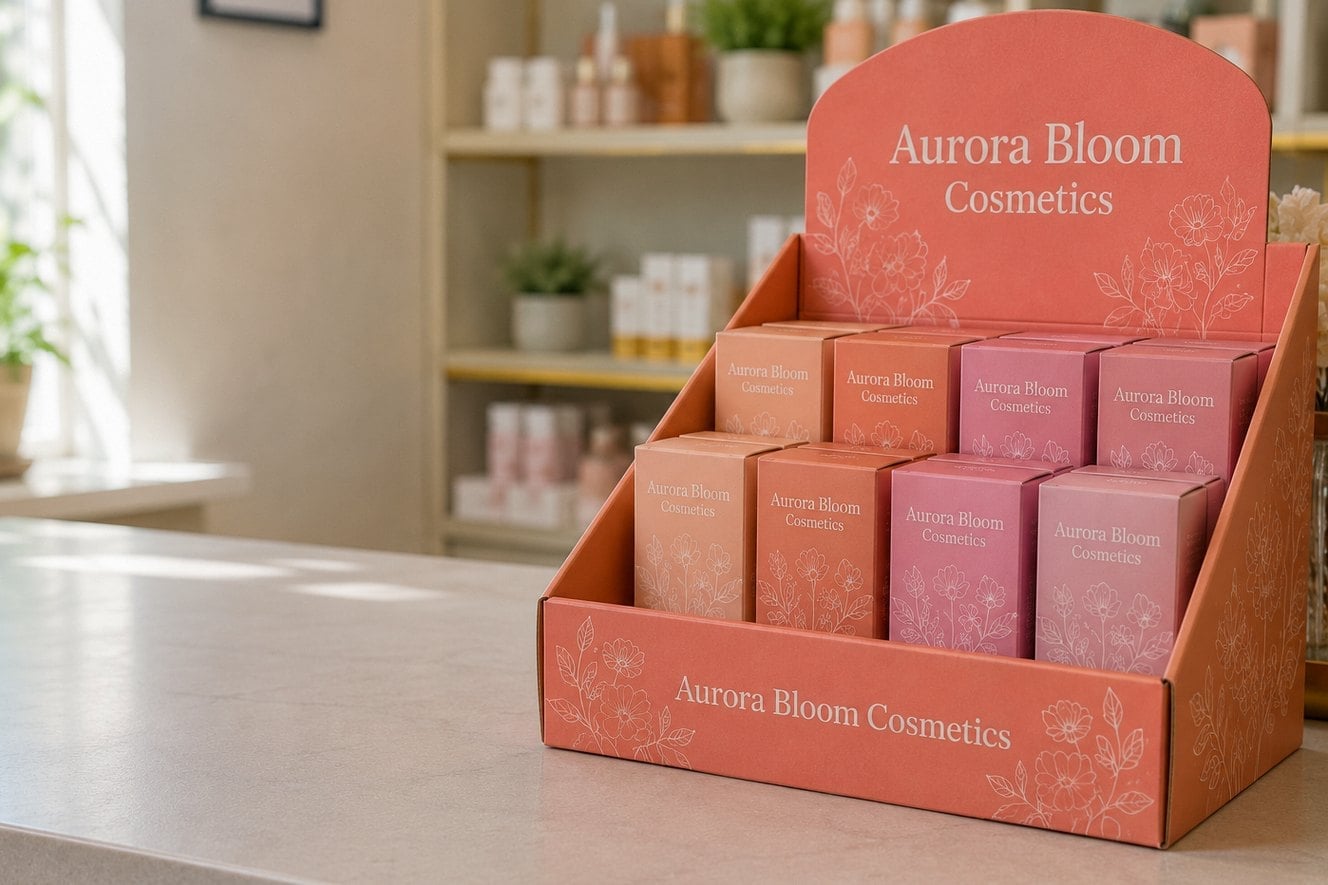
- Customized Display Boxes provides the dieline for your chosen display style
- A free mockup arrives within 24 hours, with unlimited revisions
- Nothing is paid until you approve the final design
- Header cards, front lips and side panels each need their own message
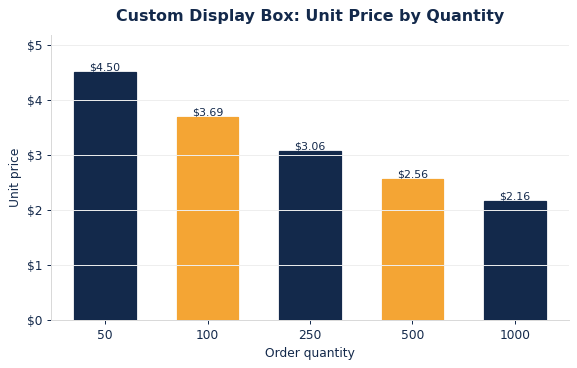
- Minimum order is 12 display boxes, with standard turnaround of about 2 weeks
What is a dieline and why does display box artwork depend on it?
A dieline is the flat, unfolded outline of a display box, showing every cut line, fold line and glue flap. Display box artwork has to be built on the dieline because a counter display or PDQ tray is printed flat and folded afterwards, so a logo that looks centered on screen can end up split across a fold or hidden under a tuck flap.
Customized Display Boxes supplies the dieline for the style you pick, whether that is a countertop display box, a gravity-feed unit or a dump bin. You do not need to draw one yourself. The dieline tells you where the visible faces sit when the display is assembled and stocked, and which areas end up inside, underneath or covered by product.
Treat the dieline as a map of what shoppers will actually see. The most valuable space on most retail displays is the header card and the front lip, because those stay visible even when the box is full. Side panels matter on end caps and checkout counters, where shoppers approach from an angle. The base and inside walls are usually hidden, so they rarely need more than a solid color or a simple pattern.
Which panels of a display box should carry which message?
Each panel of a display box has a different job, and the artwork works best when you assign one message per panel instead of repeating the logo everywhere. The header card sells, the front lip identifies, and the side panels reinforce. Planning that split before design saves several rounds of revisions.
| Panel | What shoppers see | What to put there |
|---|---|---|
| Header card | The first thing seen from the aisle or across the counter | Logo, a short product promise, one strong image |
| Front lip | Visible at eye level when the box is full | Brand name and product name, large and simple |
| Side panels | Seen from end caps and angled approaches | Supporting benefit, flavor or variant names |
| Inside back wall | Revealed as product sells down | Pattern, secondary logo or a reorder prompt |
| Base and flaps | Mostly hidden once assembled | Solid brand color or plain board |
The inside back wall is an overlooked opportunity. As the front rows sell, the back wall becomes visible, so a pattern or message there keeps a half-empty display looking deliberate rather than picked over.
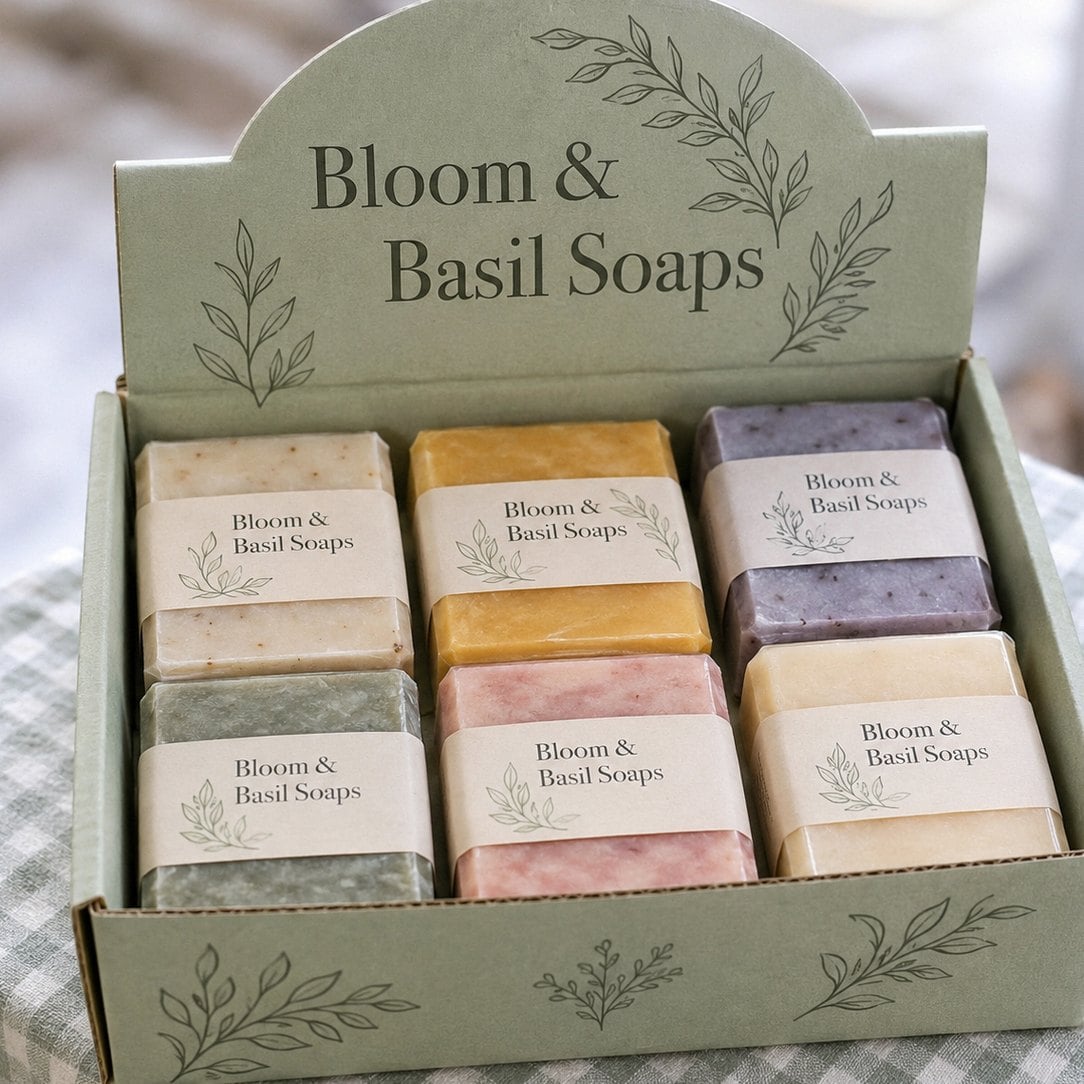
How do I keep my brand colors consistent on corrugated display boxes?
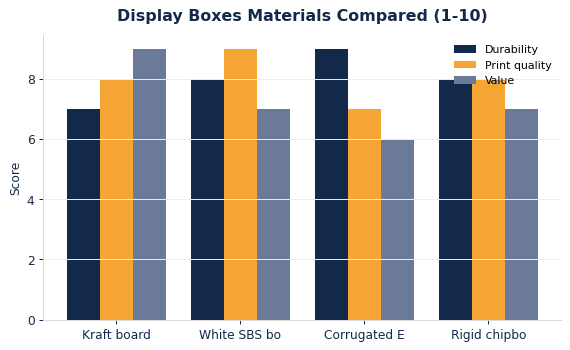
Brand colors stay consistent on display boxes when you supply exact color references and approve a mockup before printing. Corrugated board is more absorbent than paper labels or folding cartons, so colors can print slightly darker or duller, especially on brown kraft board. White-top board gives the cleanest, brightest result for most brand palettes.
Send the color codes from your brand guide along with your logo files. If your product packaging uses a specific red or a pale pastel, mention it, because the display will sit right next to the product and any mismatch shows immediately. The print method also matters: litho-laminated boards handle photographic detail and fine gradients well, while flexo suits bold, flat colors. Our guide to litho, flexo and digital print methods explains the trade-offs.
- Use solid brand colors for large areas such as header backgrounds.
- Keep fine gradients for litho-printed panels where detail holds up.
- Avoid placing thin light text on a dark kraft background.
- Ask for the same board and coating on reorders so later batches match.
What files should I prepare for display box artwork?
The most useful starting point is vector artwork for your logo and type, plus the highest-resolution product photos you have. Vector files scale cleanly across a large header card, while low-resolution images can look soft when stretched across a floor display or gravity-feed front panel.
Beyond the logo, gather the pieces that make a display box specific to your product line:
- Your logo in vector form, with a version that works on dark backgrounds.
- Product photography, ideally on a clean background so it can be cut out.
- The exact wording for the header message and any variant names.
- Brand color references and the fonts used on your packaging.
- Any retailer requirements, such as space for a shelf tag or barcode.
If some of this is missing, Customized Display Boxes can still start. The design team can rebuild a logo, suggest layouts and place product imagery on the dieline, then return a mockup within 24 hours. You can review the full process on the how it works page.
Where should text and logos sit to avoid folds, cuts and glue flaps?
Text and logos on a display box should sit well inside each panel, away from fold lines, cut edges and glue areas. Anything placed too close to a crease can crack, wrap around a corner or disappear when the box is assembled. Safe zones on the dieline show where important content belongs.
Background colors and patterns are different: those should run past the cut line into the bleed area, so the finished edge shows no thin strip of bare board. The mockup from Customized Display Boxes shows both the flat layout and the folded view, which makes these problems easy to spot.
- Keep logos and claims inside the safe zone on every panel.
- Extend backgrounds into the bleed so edges look clean after cutting.
- Do not center a headline across a fold between header and side panel.
- Leave the glue flap free of anything you need people to read.
- Check that the front lip text is not hidden behind the first row of product.
Gravity-feed and dump bin displays have more complex folds than a simple counter tray, so give those dielines extra attention before approval.
How should I check a display box proof before approving it?
A display box proof should be checked panel by panel, at the size and angle a shopper will see it, before you approve anything. Customized Display Boxes sends a free mockup within 24 hours, offers unlimited revisions, and asks for nothing until you approve the design, so take the time to review it properly.
Read every word aloud, including variant names and small print on the side panels. Confirm that the logo, product photo and colors match your current packaging, not an older version. Then picture the box stocked: does the header still read when products fill the tray, and does the front lip show the brand name clearly?
- Check spelling, product names and any legal copy.
- Compare colors against your actual product packaging.
- Review the folded view, not only the flat dieline.
- Confirm the header message reads from a distance.
- Look for content that falls on folds or glue flaps.
- Ask a colleague who has not seen the design to review it too.
Once approved, standard production takes about 2 weeks, with faster turnaround available through express shipping.
What artwork mistakes are most common on custom display boxes?
The most common display box artwork mistakes are crowded header cards, text too small to read from the aisle, and logos placed where the product will cover them once the box is full. These mistakes rarely show on a flat screen preview, which is why the folded mockup matters.
Another frequent problem is copying packaging artwork directly onto the display. Product packaging is designed to be read in the hand, while a display has to work from a distance, so the same layout often looks busy at shelf level. Simplify: one message, one image and a clear brand name usually outperform a panel crammed with claims.
- Too many messages competing on the header card.
- Light text on kraft board that fades into the background.
- Low-resolution product photos stretched across large panels.
- Ignoring how the display looks when half the product has sold.
- Forgetting to leave room for a retailer barcode or shelf tag.
Brands launching seasonal or limited lines, such as the confectioners in our candy and confectionery display box guide, often reuse one dieline and swap only the header and color panels, which keeps reorders fast and consistent.
How do I start a display box artwork request with Customized Display Boxes?
Starting is simple: choose a display style, send whatever artwork you have, and request a quote. Customized Display Boxes handles the dieline, places your artwork, and returns a free mockup within 24 hours. The minimum order is 12 display boxes, which makes it easy to test a new design in a few stores before a wider rollout.
If you are unsure which style suits your product, browse the custom display boxes range or the PDQ shelf-ready trays, then mention your preferred style on the quote form. Include your product size, the number of units per display and where the boxes will be used, and the design team will fit the artwork to the right dieline.
Frequently asked questions
Do I need to create my own dieline for a custom display box?
No dieline work is needed on your side for custom display boxes. Customized Display Boxes supplies the dieline for the counter, gravity-feed, PDQ or floor style you choose, then places your logo and imagery on it. You simply send your artwork and product details, and the design team returns a free mockup within 24 hours showing both the flat layout and the folded box.
Can display box artwork include product photography?
Product photography works very well on display boxes, especially on the header card where shoppers look first. Send the highest-resolution photos you have, ideally shot on a clean background so the product can be cut out. Litho-laminated printing reproduces photographic detail best, while flexo is better suited to bold flat colors, so the photo style can guide the print method choice.
Can the inside of a display box be printed?
Display boxes can carry printing on the inside back wall and inner panels, which become visible as product sells down. Many brands add a pattern, a secondary logo or a short message there so a half-empty display still looks intentional. Customized Display Boxes can show interior printing on the mockup, so you can judge whether it is worth adding before approving the design.
Will my brand colors look the same on kraft corrugated board?
Brand colors on kraft corrugated display boxes usually print darker and warmer than on white board, because the brown base shows through the ink. Bright or pale colors shift the most. If exact color matters, choose white-top board instead. Customized Display Boxes notes the board choice on your mockup, so you can compare options before anything goes into production.
How large should the text be on a display box header card?
Header card text on display boxes should be large enough to read from several steps away, since shoppers see it from the aisle or across a counter. Keep the main message short, ideally a few words, and use your boldest brand font. Smaller supporting details belong on side panels. The folded mockup helps you judge whether the header reads clearly at real viewing distance.
Can I use the same artwork across different display box styles?
Your core artwork can be adapted across display box styles, but each style needs its own layout because the panels differ in shape and size. A countertop tray, a gravity-feed unit and a floor stand all place the header and front lip differently. Customized Display Boxes refits your logo, imagery and message to each dieline so the brand looks consistent across every format.
Should a barcode or shelf tag area appear on a retail display box?
Some retailers ask for a barcode or a clear area for a shelf tag on display boxes, so check their requirements before artwork is finalized. Placing that space on a side panel or the base usually keeps the header clean. Mention any retailer guidelines on the quote form, and Customized Display Boxes will reserve the right area on the dieline from the first mockup.
What happens if I spot an error after approving display box artwork?
Errors found on display box artwork after approval are hardest to fix once printing starts, which is why careful proof checking matters. Contact the team as quickly as possible, since a change may still be possible before production begins. To avoid this, review spelling, colors and the folded view on every mockup, and use the unlimited revisions offered before you approve.
Can I change only the header card artwork for a seasonal reorder?
Seasonal reorders of display boxes often keep the same dieline and base design while swapping the header card and a few color panels. That approach keeps your brand consistent and speeds up approval because most of the artwork is already settled. Customized Display Boxes can prepare a new mockup for the updated header within 24 hours, with the same minimum order of 12.
Does display box artwork need to account for the product sitting in front of it?
Display box artwork must account for product placement, because stocked items cover large parts of the front and inner walls. Logos and key messages placed low on the front panel often disappear behind the first row. Put the brand name on the front lip and header card instead. Customized Display Boxes can show where product sits on the mockup to guide placement.
Is a gloss or matte finish better for display box artwork?
Gloss finishes on display boxes make colors and product photos look richer and more vivid, while matte finishes reduce glare under bright store lighting and give a calmer, premium feel. The right choice depends on your packaging and the store environment. Many brands match the finish already used on their product packaging so the display and product look like one family.
Can I request two artwork versions to compare before ordering display boxes?
Comparing two artwork directions for display boxes is a sensible way to decide before ordering. Customized Display Boxes offers unlimited revisions, so you can ask for an alternative header message or color treatment alongside the first mockup. Review both versions in the folded view, share them with your team or a retail buyer, and approve the one that reads best.
Get a free mockup for your display boxes
Send your logo or idea and the quantity you have in mind. Customized Display Boxes returns a free mockup within 24 hours, you approve the design before anything is produced, and standard turnaround is about two weeks with faster options available. Get a custom quote.